
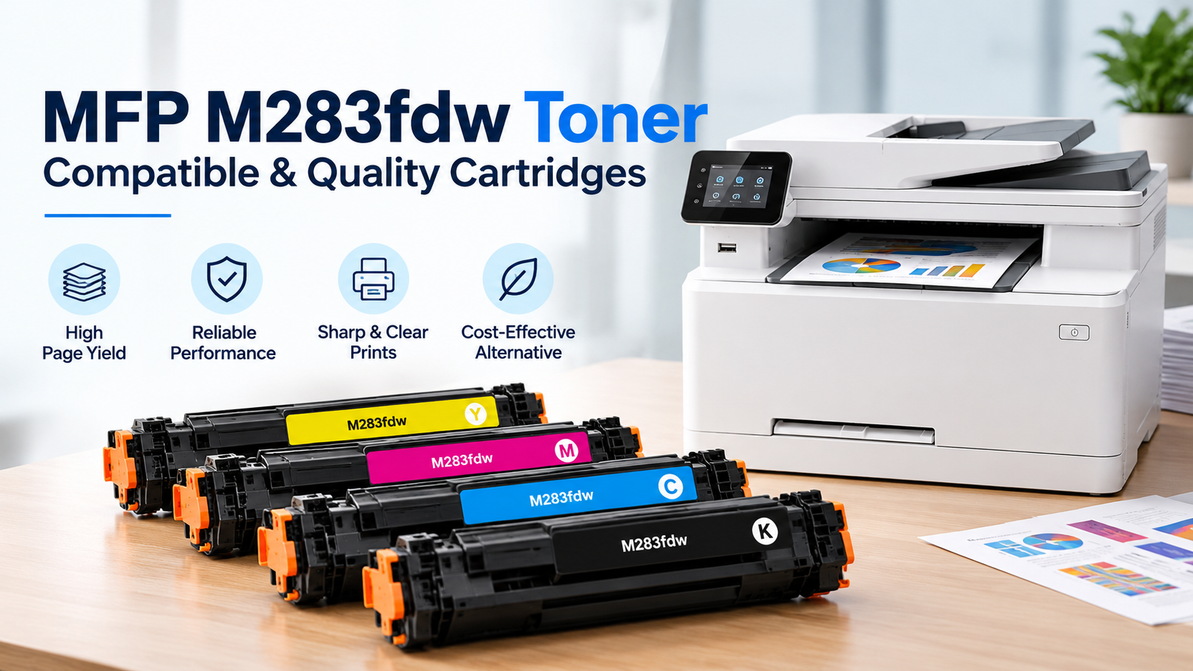
MFP M283fdw Toner – Compatible & Quality Cartridges
The HP Color LaserJet Pro MFP M283fdw is designed for offices that need more than basic printing. This multifunction printer can print, scan, copy, and fax, making it a practical choice for businesses that handle documents throughout the day.
Like any color laser printer, the M283fdw depends on the right toner cartridges to deliver clear text, balanced colors, and consistent print quality. Choosing compatible and reliable MFP M283fdw Toner is therefore an important part of maintaining smooth office printing.
Whether you regularly print reports, invoices, presentations, marketing materials, or color graphics, selecting the correct toner cartridge can help support dependable performance and professional-looking documents.
A Toner Setup Designed for Four-color Printing
The HP Color LaserJet Pro MFP M283fdw uses a four-cartridge color toner system. Instead of using a single cartridge for all printed content, the printer combines four toner colors to produce the final document.
The four toner colors are:
- Black (K) – Primarily used for text and dark areas
- Cyan (C) – Used to create blue and green tones
- Magenta (M) – Used for red, purple, and related shades
- Yellow (Y) – Used for yellow and other mixed colors
Together, these four colors allow the printer to produce everything from everyday black-and-white documents to colorful presentations, graphics, charts, and marketing materials.
Each color has its own cartridge. Therefore, when the printer identifies one cartridge as low or empty, you generally only need to replace that specific color rather than replacing all four cartridges at once.
Which Toner Does the MFP M283fdw Use?
The HP Color LaserJet Pro MFP M283fdw uses the HP 206A and HP 206X toner series.
The 206A series provides standard-yield cartridges, while the 206X series offers higher-yield options. Both series are available across the black, cyan, magenta, and yellow cartridges, depending on the product and market.
When purchasing MFP M283fdw Toner, it is important to match the toner series with your printer and select the correct color.
Always check the cartridge specifications and compatibility information for your location and exact printer before placing an order.
206A or 206X: Which Capacity Is Right for Your Office?
The choice between 206A and 206X generally depends on your printing volume and how frequently you need to replace toner.
The 206A cartridges offer standard yield and can be suitable for offices with moderate printing requirements.
The 206X cartridges are designed for higher page yields and may be more suitable for businesses with heavier printing workloads. If the M283fdw is shared by several employees or used regularly for color documents, higher-yield cartridges can help reduce the frequency of cartridge replacement.
Your actual toner consumption will also depend on the type of documents you print. Text-heavy documents generally use less toner than presentations, photographs, brochures, and documents with large areas of color.
Compatible MFP M283fdw Toner: What to Look For
Compatible toner cartridges are third-party alternatives designed for use with specific printer models. They can provide an option for businesses looking to manage printing costs while maintaining dependable print performance.
When comparing compatible MFP M283fdw Toner, consider the following:
- Printer compatibility
- Toner series, such as 206A or 206X
- Cartridge color
- Estimated page yield
- Product specifications
- Supplier reputation
- Warranty or product support, where applicable
The most important consideration is compatibility. A cartridge should be specifically listed as suitable for the HP Color LaserJet Pro MFP M283fdw and the appropriate 206A or 206X series.
Simply choosing a cartridge described as “HP compatible” is not enough. Always verify the exact printer model and cartridge series before purchasing.
Signs Your M283fdw Needs New Toner
The M283fdw will generally provide an on-screen notification when a toner cartridge is running low. However, you may notice changes in print quality before the cartridge is completely depleted.
Common signs include:
- Faded black text
- Weak or inconsistent colors
- Uneven coverage on graphics
- One color appearing lighter than usual
- Low-toner notifications
- Reduced contrast in printed documents
- Streaks or inconsistent print density
If only one color appears affected, the corresponding toner cartridge may be running low.
However, not every print-quality issue is caused by toner. Paper quality, printer settings, calibration, imaging components, or other maintenance requirements can also affect the final print.
If replacing the toner does not resolve the problem, check the printer's maintenance and troubleshooting recommendations.
Getting Better Value From Your M283fdw Toner
The cheapest cartridge is not always the most economical choice for every office. When selecting MFP M283fdw Toner, consider your actual printing volume and the types of documents your business produces.
For offices with moderate printing requirements, standard-yield cartridges may be sufficient.
For businesses with high-volume printing, high-yield cartridges may reduce the frequency of replacements and make toner management more convenient.
It can also be useful to monitor how quickly your office uses each color. Black toner may be consumed more quickly in text-heavy environments, while color cartridges may be used more frequently when printing presentations, brochures, graphics, or promotional materials.
Keeping commonly used replacement cartridges available can also help prevent unexpected interruptions when a toner cartridge runs out.
Installation and Storage Tips
Proper handling and storage can help protect toner cartridges before they are installed.
Follow these basic practices:
- Keep replacement cartridges sealed in their original packaging until needed.
- Store toner in a dry, suitable environment.
- Protect cartridges from excessive heat and direct sunlight.
- Follow the printer manufacturer's installation instructions.
- Remove all packaging materials before installation.
- Make sure the cartridge is correctly positioned inside the printer.
- Check the printer display after installation for any error messages.
If the printer continues to report a cartridge problem after installation, verify that the correct cartridge was purchased and that it has been installed properly.
Why the Right Cartridge Matters for an MFP
The M283fdw is more than a standard printer. It combines printing, scanning, copying, and faxing capabilities in one multifunction device, making it part of the everyday workflow for many offices.
When printing is interrupted because the correct toner is unavailable, the inconvenience can affect more than a single print job. Employees may need to delay reports, presentations, invoices, or other important documents.
For organizations with predictable monthly printing requirements, maintaining an appropriate supply of replacement toner can help reduce unexpected interruptions.
Choosing the right MFP M283fdw Toner also makes toner purchasing easier because businesses can plan replacements around their actual printing volume and cartridge requirements.
MFP M283fdw Toner From T3RS
T3RS provides toner and printing consumables for businesses, offices, schools, and organizations that rely on dependable printing equipment.
For users of the HP Color LaserJet Pro MFP M283fdw, selecting the correct toner series and color is essential before placing an order.
Whether you need a replacement black cartridge or a specific cyan, magenta, or yellow cartridge, matching the product to the M283fdw and the appropriate 206A or 206X series can help make the purchasing process easier.
For businesses that depend on regular color printing, having suitable replacement cartridges available can also help maintain a smoother workflow and reduce unexpected printing interruptions.
MFP M283fdw Toner FAQs
What toner does the M283fdw use?
The HP Color LaserJet Pro MFP M283fdw uses the HP 206A and HP 206X toner families. Always confirm the specific color and cartridge series before purchasing.
Does the M283fdw use separate color cartridges?
Yes. The printer uses separate toner cartridges for black, cyan, magenta, and yellow.
What is the difference between 206A and 206X?
The 206A and 206X are different yield options within the same toner family. 206A cartridges provide standard yield, while 206X cartridges are high-yield options designed for greater page capacity.
Can I use compatible toner in the M283fdw?
Compatible toner cartridges are available for the M283fdw. Choose a cartridge that is specifically listed as compatible with the HP Color LaserJet Pro MFP M283fdw and the correct 206A or 206X series.
Do I need to replace all four toner cartridges together?
No. Each color has its own cartridge, so you can generally replace only the cartridge that has reached its replacement point.
Why are my M283fdw prints faded?
Low toner is one possible cause of faded printing. Other factors, including paper, printer settings, calibration, and imaging components, can also affect print quality. If replacing the toner does not resolve the problem, further printer maintenance may be required.
Keep Your M283fdw Ready for the Next Print Job
The HP Color LaserJet Pro MFP M283fdw is designed for businesses that need dependable multifunction printing, and choosing the right toner is an important part of maintaining a smooth workflow.
Before purchasing MFP M283fdw Toner, always confirm your printer model, cartridge color, and the required 206A or 206X series.
For offices with regular printing requirements, keeping frequently used replacement cartridges available can help reduce unexpected interruptions and keep essential documents moving.
Explore compatible and quality MFP M283fdw Toner from T3RS and find the right cartridge for your printing requirements.
Recent Posts
-
YN156 OEM Dell – Genuine Printer Toner Cartridge
Printer toner is an essential office supply, but it is often overlooked until a cartridge starts run …2nd Nov 2026 -
HP Black High Yield InkJet – Long-Lasting Ink for Everyday Printing
Running out of black ink in the middle of an important printing job can be frustrating, especially w …29th Oct 2026 -
HP Color LaserJet Toner – Quality Toner Cartridges for Consistent Color Printing
Clear and consistent color printing is important for businesses, offices, schools, and organizations …25th Oct 2026