
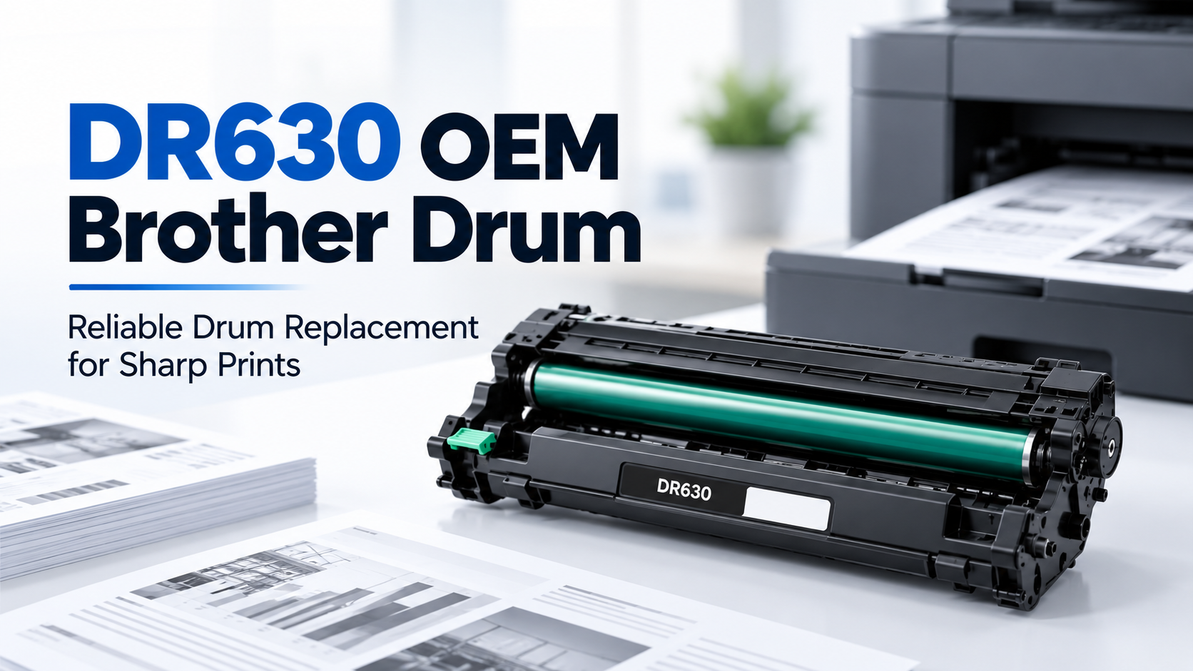
DR630 OEM Brother Drum: Reliable Drum Replacement for Sharp Prints
If your Brother laser printer has started putting out streaked pages, faded text, or the same mark repeating down every sheet, toner usually isn't the problem. It's the drum. The DR630 OEM Brother Drum is the part that actually needs replacing, and getting the right one back in your printer is a lot simpler than most people expect once you know what you're looking at.
What the DR630 Actually Does
Every laser printer builds its image using an electrostatic charge on a rotating drum before that image gets transferred to paper. Toner supplies the powder. The drum is what shapes it into the letters and graphics you actually see on the page. Over time, that drum surface wears down, and no amount of fresh toner fixes the problem once it does.
The DR630 is Brother's OEM drum unit built specifically for its L2300–L2740 series of monochrome laser printers. It's rated for roughly 12,000 pages, and it's designed to work in step with Brother's TN630 and TN660 toner cartridges.
Quick Specs
- Part number: DR630 / DR-630
- Type: Monochrome drum unit (black)
- Rated yield: Approximately 12,000 pages
- Pairs with: TN630 and TN660 toner cartridges
- Manufacturer: Brother, OEM
Signs Your Drum Needs Replacing, Not Your Toner
A drum problem and a toner problem can look similar at a glance, but the symptoms usually give it away:
- Vertical streaks or lines running the length of the page
- A repeating mark or smudge that shows up at the same interval on every sheet
- Faded or inconsistent print that doesn't improve after a fresh toner cartridge goes in
- Ghosting, where a faint image of previous content reappears lower on the page
If you've already swapped the toner cartridge and the issue is still there, the drum is almost always the next thing to check.
Which Printers Use the DR630
The DR630 is built for Brother's compact monochrome laser lineup. It's the correct drum for:
- HL series: HL-L2300D, HL-L2305W, HL-L2315DW, HL-L2320D, HL-L2340DW, HL-L2360DW, HL-L2380DW
- DCP series: DCP-L2520DW, DCP-L2540DW
- MFC series: MFC-L2680W, MFC-L2685DW, MFC-L2700DW, MFC-L2705DW, MFC-L2707DW, MFC-L2720DW, MFC-L2740DW
If your printer isn't on this list, don't assume the DR630 will fit. Brother uses different drum numbers across its other laser series, and a mismatched drum simply won't seat correctly, even if the packaging looks similar.
Genuine OEM vs. Compatible: What Actually Changes
Compatible DR630 drums are widely available and typically cost less upfront. For low-volume, internal printing where a little inconsistency isn't a dealbreaker, that can be a reasonable trade-off.
Genuine OEM drums are manufactured to Brother's own tolerances, which matters more for drums than it does for toner. A drum affects image quality for its entire 12,000-page lifespan, not just a single cartridge's worth of printing, so a defect or inconsistency in the drum surface repeats itself across thousands of pages rather than a few hundred. For business, legal, or client-facing documents where sharp, even output matters every time, genuine OEM is the safer call.
Installing and Resetting the DR630
Swapping in a new DR630 is a five-minute job on most Brother models:
- Power on the printer and open the front cover.
- Remove the old drum and toner assembly as a unit, then separate the toner cartridge from the drum.
- Insert the toner cartridge into the new DR630 drum unit.
- Slide the assembled unit back into the printer and close the front cover.
- Reset the drum counter: press and hold OK until "Drum Unit" appears on the display, press OK, then use the arrow keys to select "Reset."
Skipping the reset step is the most common mistake. Without it, the printer keeps counting pages against the old drum's usage total and may throw a "Replace Drum" warning well before the new unit is actually worn out.
Where T3RS Fits In
T3RS carries the genuine OEM DR630 Brother Drum in stock, alongside compatible TN630 and TN660 toner to match. We're based in Rancho Cordova, California, and we're R2v3 and ISO 45001 / ISO 14001 certified, plus a certified California small business. That's reflected in how we source and handle everything we sell, not just a line in the footer.
Ordering the DR630 through T3RS means:
- Real-time stock that reflects what's actually in our warehouse
- Straightforward pricing with no checkout surprises
- Business, school, and government accounts available for recurring orders and PO support
- Toner and drum recycling programs, so your old DR630 doesn't end up in a landfill
FAQs About the DR630 OEM Brother Drum
How many pages does the DR630 last?
The DR630 is rated for approximately 12,000 pages, though actual output varies based on print coverage and document type.
Do I need to replace the toner and drum at the same time?
No. The DR630 drum typically outlasts multiple toner cartridges, since drums are rated for a higher page count than the TN630 or TN660 toner it pairs with.
Why does my printer still show "Replace Drum" after I installed a new one?
This almost always means the drum counter wasn't reset after installation. Resetting it through the printer's menu clears the old usage count.
What's the difference between the DR630 and DR660?
Brother uses different drum numbers for different printer series. Check your printer's model number against the compatibility list rather than assuming drums are interchangeable across series.
Can I use a compatible DR630 instead of genuine OEM?
You can, and many compatible versions work reliably for everyday, low-volume printing. For consistent output across the full page yield, especially in a business setting, genuine OEM tends to hold up more predictably.
Does the drum come with toner included?
No. The DR630 is sold as a drum unit only. It needs to be paired with a TN630 or TN660 toner cartridge, which is installed inside the drum assembly.
Get Your DR630 From T3RS
If your Brother printer is showing streaks, ghosting, or a drum warning, the DR630 OEM Brother Drum is the fix. Check current stock and pricing at T3RS, and reach out if you're ordering for a business or institution and want to set up recurring supply orders.
Recent Posts
-
Samsung Printer Ink: Choosing the Right Toner for Your Printer
If your Samsung printer has suddenly started producing pale text, uneven graphics, or documents that …20th Oct 2026 -
Dell Laser Printer Cartridges: How to Choose the Right Toner
At some point, every office using a Dell laser printer has to replace the toner. The printer may hav …18th Oct 2026 -
MFP M283fdw Toner – Compatible & Quality Cartridges
The HP Color LaserJet Pro MFP M283fdw is designed for offices that need more than basic printing. Th …14th Oct 2026